
For small businesses, an IT budget isn’t just a line item. It’s a strategic investment in productivity, security, and long-term growth.
But many business owners either underestimate IT costs or overspend in the wrong areas, leading to downtime, security risks, and frustrated employees.
So what should an IT budget actually include for a small business or mid-sized organization in 2026?
Let’s break it down.
.
Why an IT Budget Matters for Small Businesses
A well-planned IT budget does more than cover technology expenses—it directly impacts:
- Employee productivity (fewer tech issues, faster systems)
- Customer experience (reliable systems and communication)
- Security and compliance (avoiding costly breaches or fines)
- Scalability (supporting growth without constant rework)
Technology and cybersecurity are now seen as critical drivers of business growth. In fact, 85% of CEOs say cybersecurity is critical for growth, according to a 2025 Gartner survey.
Without a clear budget, businesses often fall into reactive spending to fix problems after they happen, which is almost always more expensive.
.
Core Components of an IT Budget
1. Hardware Costs
This includes all physical equipment your team relies on:
- Laptops and desktops
- Servers or on-premise infrastructure
- Networking equipment (routers, switches, firewalls)
- Mobile devices
💡 Human impact: Outdated hardware slows employees down and increases frustration.
💡 Business impact: Lost productivity and more frequent downtime.
2. Software and Licensing
Software is often one of the largest recurring IT expenses:
- Microsoft 365 or Google Workspace
- Industry-specific applications
- Accounting, CRM, or ERP systems
- Antivirus and endpoint protection
💡 Human impact: The right tools reduce friction and improve collaboration.
💡 Business impact: Better efficiency and fewer manual processes.
3. Managed IT Services or IT Support
Most small businesses outsource IT support or use a hybrid model.
Typical costs include:
- Help desk support
- Network monitoring and maintenance
- Patch management and updates
- Vendor management
💡 Human impact: Employees spend less time dealing with tech issues.
💡 Business impact: Predictable costs and fewer disruptions.
4. Cybersecurity Investments
Cybersecurity is no longer optional—even for small businesses.
Key budget items:
- Firewall and network security
- Endpoint detection and response (EDR)
- Email security and phishing protection
- Multi-factor authentication (MFA)
- Security awareness training
Cyber threats are increasing for SMBs in both frequency and sophistication, making proactive investment essential. A large percentage of SMBs experience cyberattacks and many lack proper protections, according to CISA’s Cyber Guidance for Small Businesses.
💡 Human impact: Employees feel confident and protected.
💡 Business impact: Reduced risk of breaches, downtime, and reputational damage.
5. Data Backup and Disaster Recovery
What happens if your data is lost or systems go down?
Your IT budget should include:
- Cloud backups
- Disaster recovery solutions
- Business continuity planning
Having a documented backup and recovery strategy that follows industry best practices for cybersecurity as a small business is critical to minimizing downtime and data loss.
💡 Human impact: Less stress during outages or incidents.
💡 Business impact: Faster recovery and minimized revenue loss.
6. Cloud Services and Infrastructure
Many SMBs are shifting to cloud-based environments:
- Cloud storage (e.g., OneDrive, Google Drive)
- Cloud hosting or virtual servers
- SaaS platforms
💡 Human impact: Access to cloud tools from anywhere.
💡 Business impact: Flexibility and scalability without large upfront costs.
7. Compliance and Regulatory Requirements
For regulated industries (healthcare, finance, nonprofits), IT budgets must include:
- Compliance tools and audits
- Data protection measures
- Documentation and reporting systems
💡 Human impact: Reduced stress around audits.
💡 Business impact: Avoidance of fines and legal risk.
8. IT Projects and Upgrades
Technology isn’t static—your budget should account for:
- System upgrades
- Hardware refresh cycles (typically every 3–5 years)
- New software implementations
- AI or automation initiatives
💡 Human impact: Employees get better tools over time.
💡 Business impact: Staying competitive and efficient.
9. Training and Change Management
Even the best technology fails without adoption.
Include:
- Employee training
- Onboarding for new tools
- Process improvements
💡 Human impact: Less frustration, more confidence using tools.
💡 Business impact: Higher ROI on tech investments.
.
How Much Should a Small Business Spend on IT?
Most small businesses spend 4% to 7% of revenue on IT, though this varies by industry.
- Lower range: Basic operations
- Higher range: Growth-focused or regulated businesses
If your spending is lower, you may be underinvesting—and exposing your business to risk.
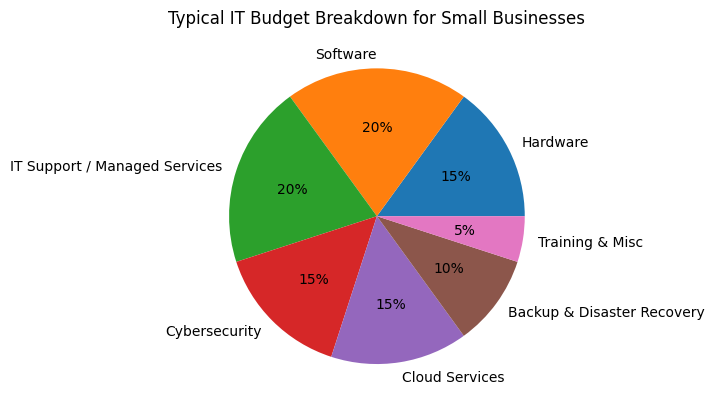
Typical IT Budget Breakdown for Small Businesses
This sample allocation shows how SMBs commonly distribute IT spending across hardware, software, cybersecurity, support, and cloud services.
.
Common IT Budget Mistakes to Avoid
- ❌ Underestimating cybersecurity needs
- ❌ Ignoring long-term upgrade cycles
- ❌ Focusing only on upfront costs instead of ROI
- ❌ Not aligning IT with business goals
- ❌ Treating IT as reactive instead of strategic
.
How to Optimize Your IT Budget
To get the most value:
- Align IT spending with business priorities
- Shift from reactive to proactive IT management
- Consolidate tools where possible
- Leverage managed services for predictability
- Explore AI and automation for efficiency gains
.
FAQs: IT Budget for Small Businesses
What is included in an IT budget for a small business?
An IT budget typically includes hardware, software, IT support, cybersecurity, cloud services, backup solutions, compliance costs, and future upgrades.
How much should a small business budget for IT?
Most small businesses allocate 4–7% of their revenue to IT, depending on their industry, growth stage, and regulatory requirements.
Is outsourcing IT more cost-effective?
Yes, for many SMBs, managed IT services provide predictable costs, access to expertise, and reduced downtime compared to hiring in-house.
What is the biggest IT expense for small businesses?
Software subscriptions and IT support services are often the largest recurring costs, followed by cybersecurity investments.
How often should an IT budget be reviewed?
At least annually, but ideally quarterly—especially if your business is growing or adopting new technologies.
.
Intentional Investments Protect and Support
An effective IT budget for a small business isn’t just about controlling costs—it’s about making intentional investments that support your people, protect your operations, and enable growth.
When your technology is aligned with your business goals, the impact shows up everywhere: employees work more efficiently, customers have better experiences, and leadership can make decisions with confidence.
The key is shifting from a reactive mindset—fixing issues as they arise—to a proactive strategy where your IT budget is planned, predictable, and tied directly to outcomes.
If you’re unsure whether your current IT spending is helping or holding you back, it may be time to take a closer look.
.
Not sure if your IT budget is aligned with your business goals?
OLS Technology helps small businesses design IT strategies that reduce risk, improve productivity, and support growth—without overspending.
👉 Schedule a free IT budget assessment today and get a clear, actionable plan for your technology investments.
.
IT That’s More Than Tech. It’s Fuel for Growth.
OLS Technology helps Pacific Northwest SMBs grow with managed IT and cybersecurity built for the real world. We focus on what matters most to your teams and your bottom line: predictable pricing, reliable tech and uptime, smarter workflows, and secure data and communication.